|
|
Purchase CZ Coin | Crashzone 1.1 Web | Crashzone 1.1 App | ORM | ARNIE | PNET | Partscheck | Audatext | Estimage |


Crashzone 1.1 User Manual
Version 1.0.0
01 Feb 2026
Summary of Features
-
Main Page
-
Details : New Job
- Quote Editor
-
View Quote
-
Main Page
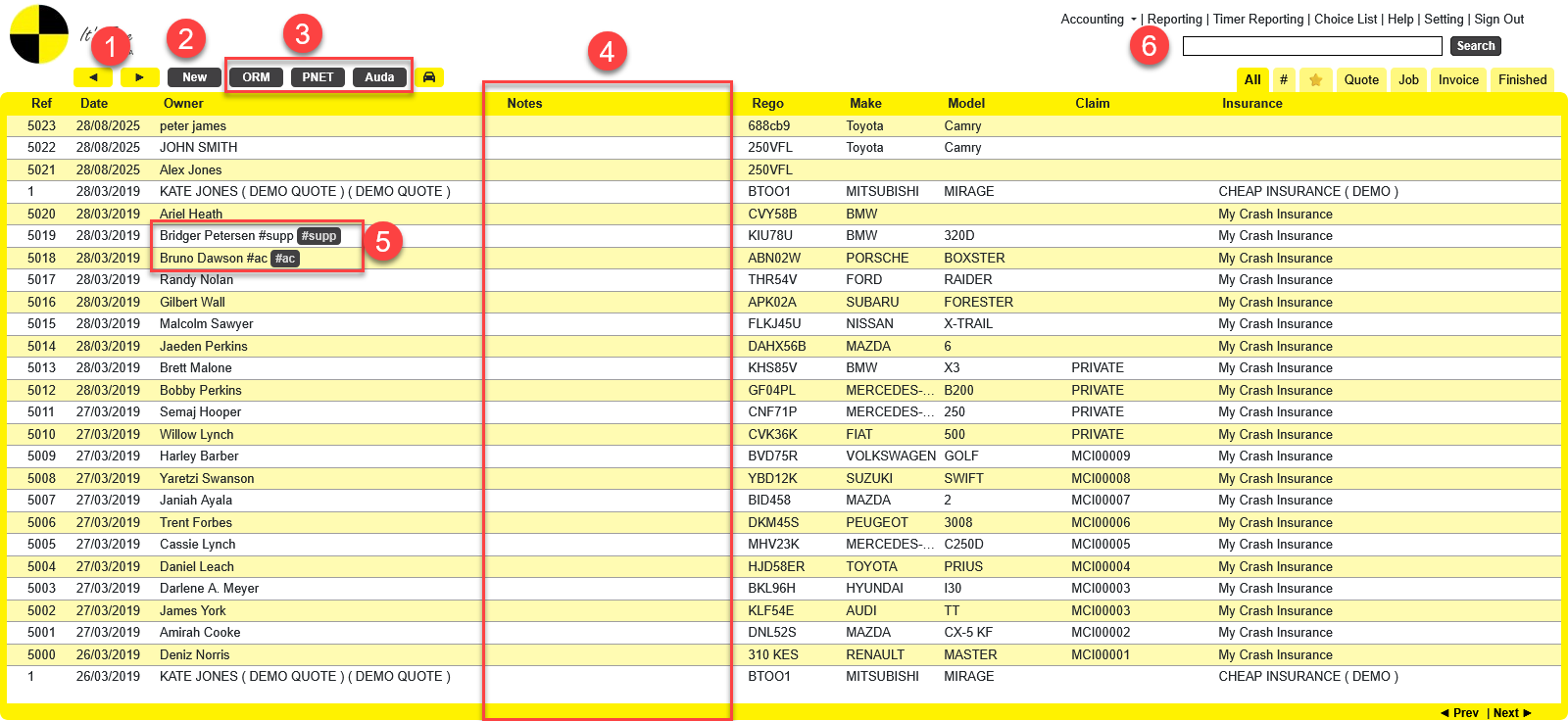
- On this page, you can see the job list. You can click the Next and Previous buttons to view and find jobs.
- Click the New button to create a new job.
- After you set up your integration account in Crashzone Settings, you can click the ORM, PNET, and Auda buttons to receive request for quotes.
- You can click on the Notes for each job to add notes.
- This is the hashtag feature. You can go to the Job Details, in the Owner section, to add hashtags to the job.
- In the search bar, you can search by Reference, Owner Rego, Make, Model, Claim, and Insurance.
- To search for an invoice, add * before the number. For example: *3
-
Details : New Job
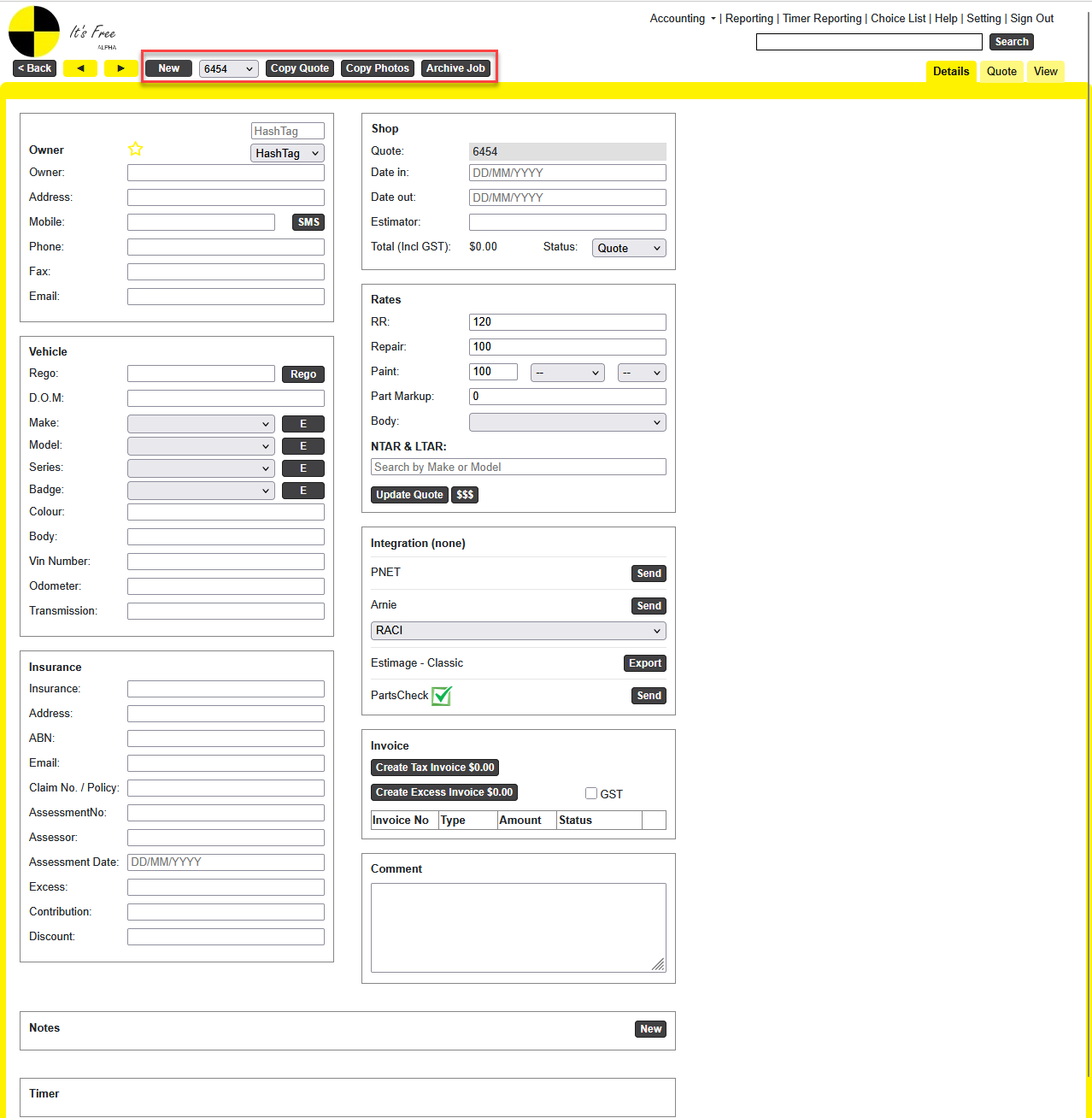
When you click New Job, the Details page will be displayed. Here, you can enter information in different sections:
- Owner: enter the owner’s details
- Vehicle: enter the vehicle details
- Insurance: enter the insurance details
- Shop section: enter Date In and Date Out and Estimator
- Rates : This is where you set the rates for each section. After entering the rates here, they will appear as default rates in the Quote Editor when you add items. You can also select or search for NTAR and LTAR here.
- Integration:Depending on your job type (manual or received as a request for quote from ORM, PNET, Audatex, or Estimage…), the relevant send button will be displayed for you to use. Before sending, you must enter your integration account in Crashzone Settings > Integration.
- Invoice: After you enter quotes and items, you can come back here to create a Tax Invoice or Excess Invoice. Tick the GST option if you want to include GST.
-
New Note
|
|
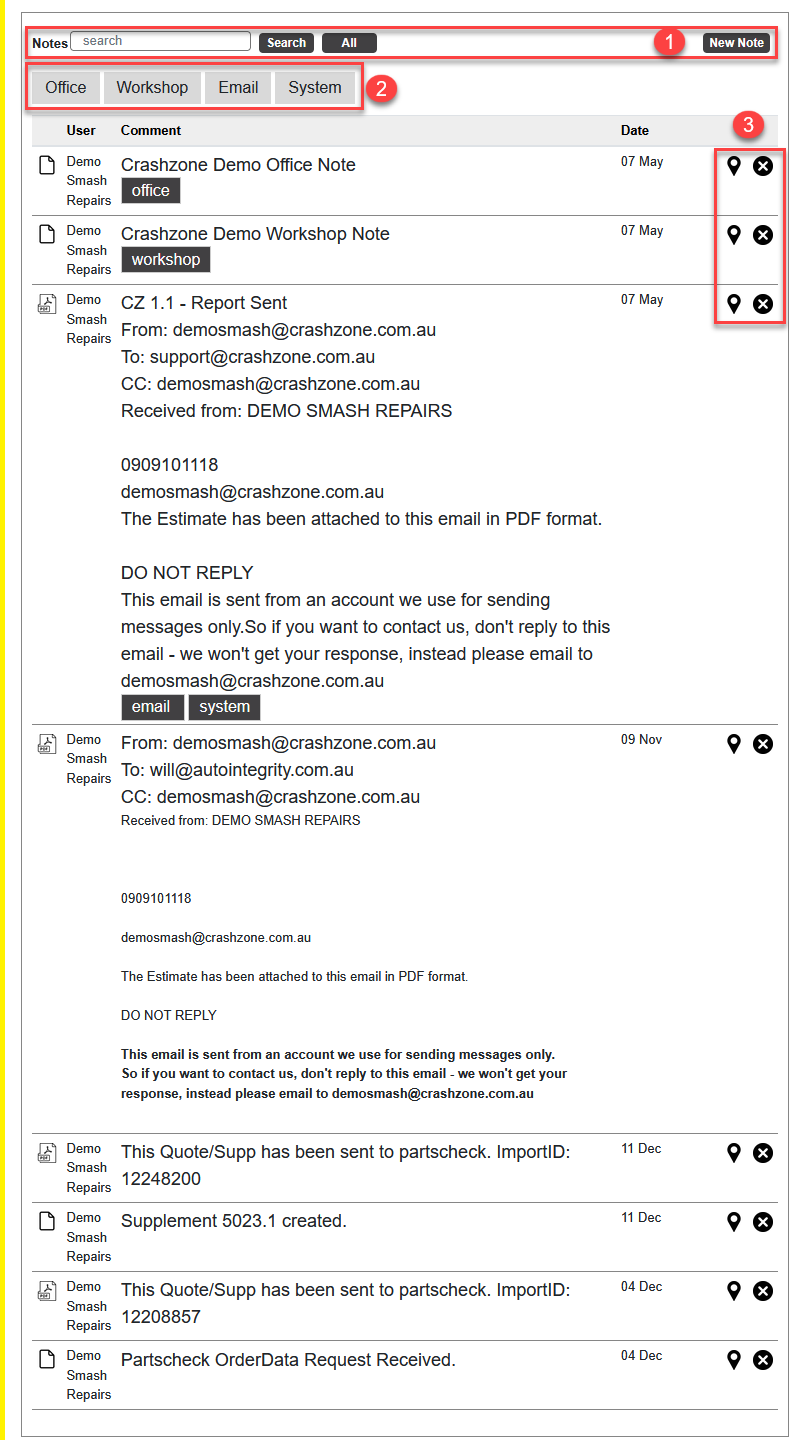
1. Search and Create New Note Search Button : Enter a keyword in the search box, then click the Search button to search notes.All : Click the All button to show all notes, including deleted notes.New Note : Click this button to create a new note and assign it to a selected user.2. Filter Notes Here, you can filter notes: Office, Workshop, Email, and System. Click an option to show matching notes, and click it again to remove the filter. 3. Pin Note and Delete
|
|
|
|


-
Quote Editor
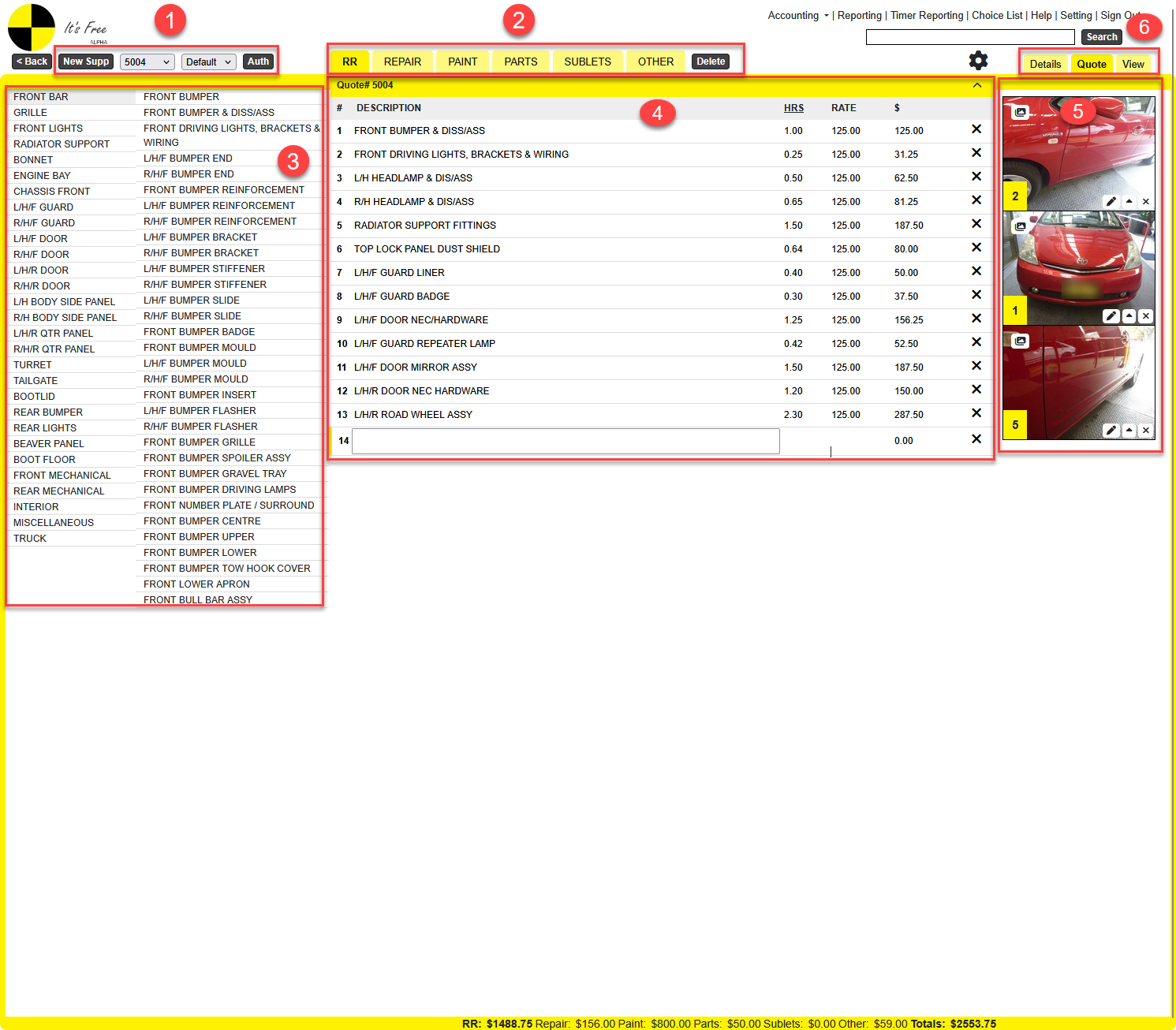
- New Supp: Click this button to create a supplementary quote.
- Quote Number : This is the Quote Number. You can select a main quote or a supplementary quote to add, update, or delete quote items.
- Pick List : This is the Pick List. You can select the Default List, Custom List, LTAR, or NTAR
- Auth : Use this to enter assessed figures for non-integration jobs. It keeps the original figures, allows adjustments, and locks the quote once saved
- In this section, you can switch between RR, Repair, Paint, Parts, Sublets, and Other to add, update, or delete quote items
- Delete button: You can click this to delete a supplementary quote, but you cannot delete the main quote
- In this section, you can select a Vehicle Area, then choose an Item Description. When you click an Item Description, the system will add the quote item to the selected quote.
- .
- Here you can see the list of added quote items. You can add, update, or delete items.
- These are the images in the job. Under each image, you will see three buttons:
- ▲ : to set it as the first photo
- X : to delete the image

- There are three buttons: Details, Quote, and View.
- You are currently on the Quote page. Click Details to go back, or View to see reporting
-
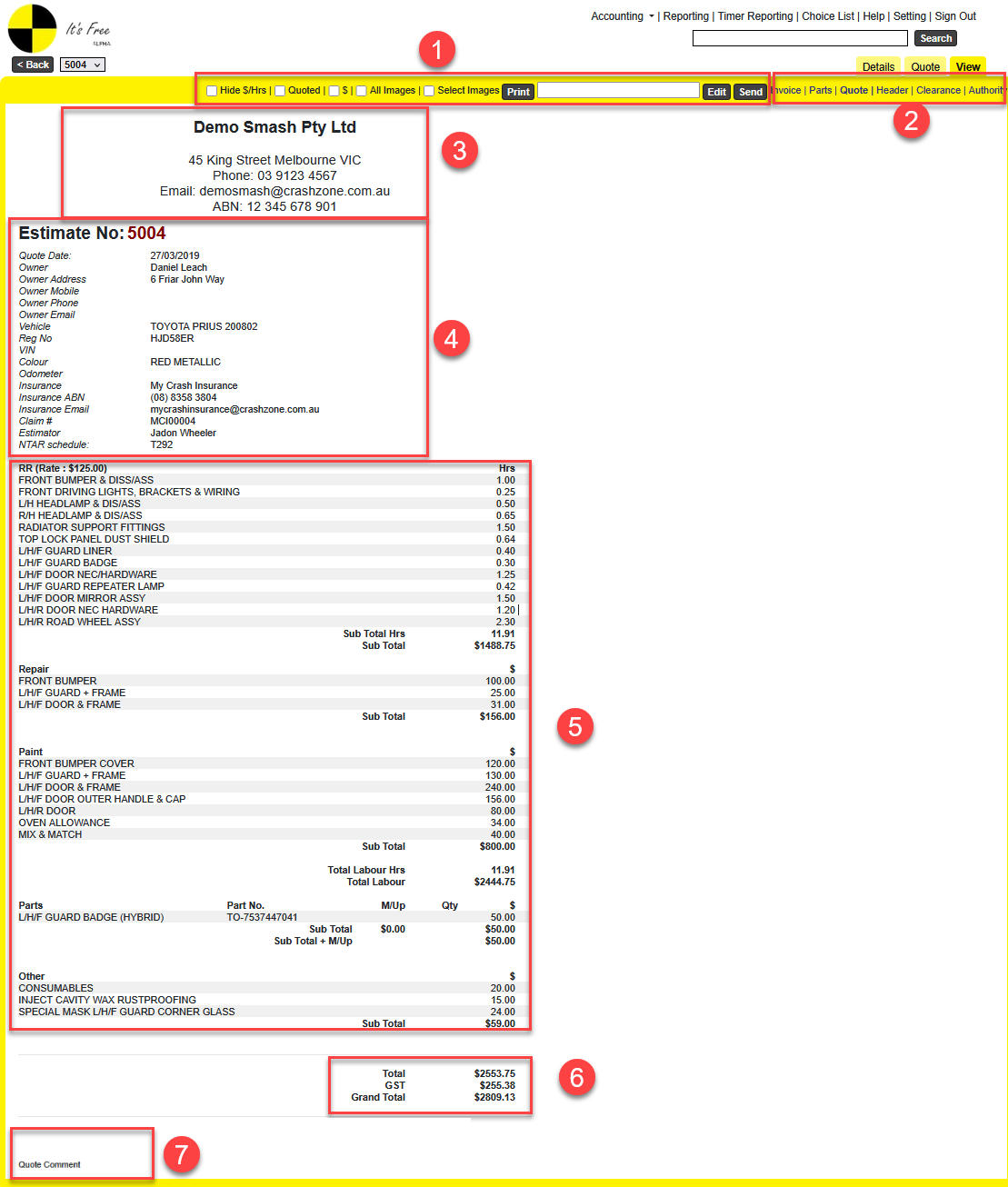
View Quote
- Hide $ / Hrs:Tick this to hide $ and Hrs in the report.
- Quoted: Tick this to show the Quoted column in the report.
- $:Tick this to display dollar values instead of hours in the report.
- All Images: Tick this to attach all images when sending the report email.
- Select Images: Tick this to choose how many images to attach before sending the email.
- Print: Click this button to print a report. The system will generate a PDF file, and you can save it to your PC
- Edit Button: Click to open a popup where you can edit the email subject and body before sending.
- Email: Select the report you want to send, enter the email address, then click Send to send the email.
- Here you can select the report you want to view: Invoice, Parts, Quote, Header, Clearance, and Authority.
- This is the letterhead. It displays company information on all reports.
- This is the job information. You can update it on the Details page.
- This shows the list of quote items by section: RR, Repair, Paint, Parts, Sublets, and Other.
- This shows the report totals, including GST, Excess, Contribution, and Discount (if available).
- This is where comments are displayed. You can add comments in Crashzone Settings > Crashzone for Quote, Invoice, and Parts.
- These comments will appear at the bottom of each job report.
|
© Copyright 2026 Crashzone Pty Ltd |
|
|
|
|